PodcastDraft · coming to the App Store
Plan the episode before the mic goes hot.
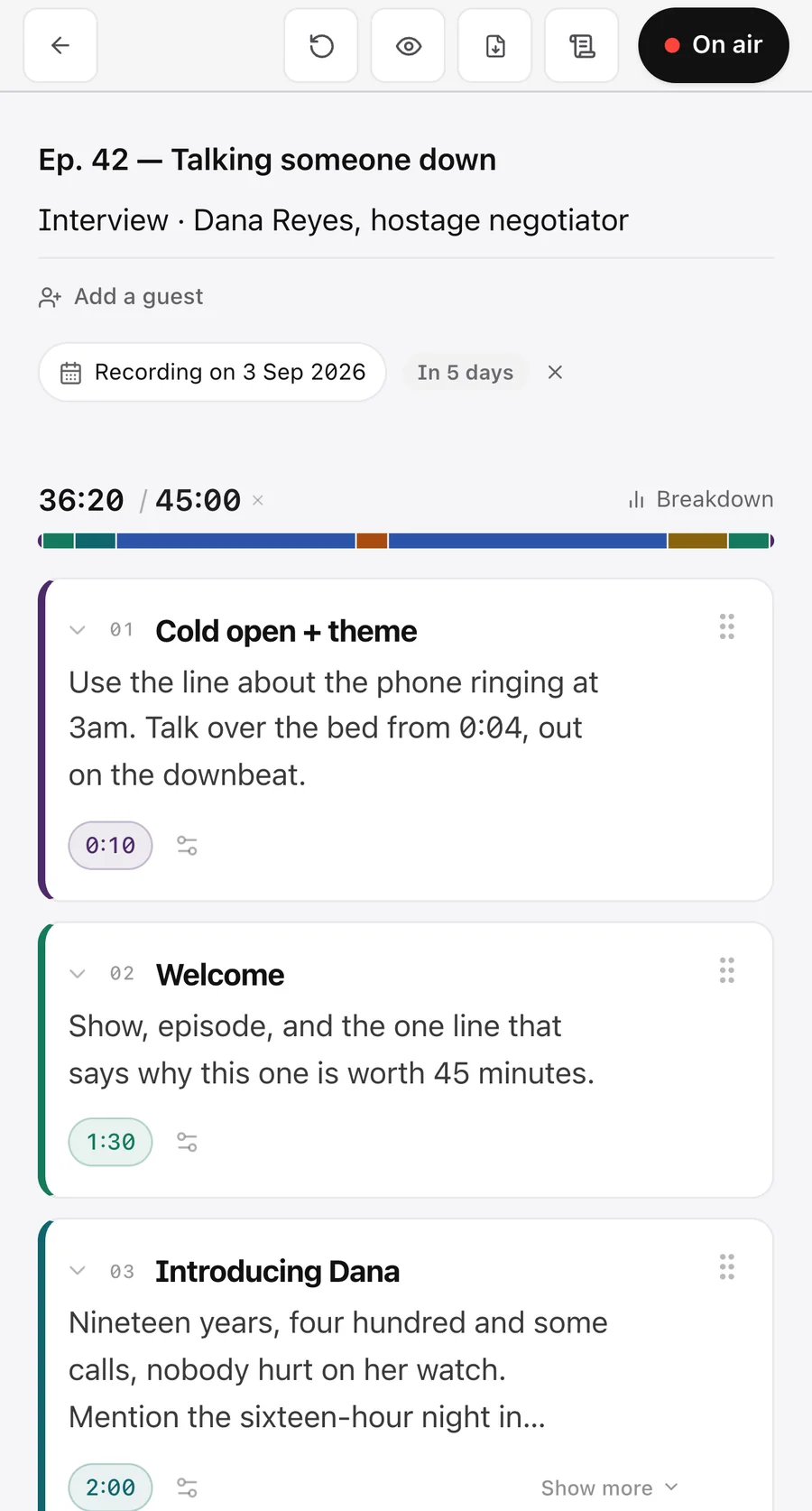
The whole episode, from the cold open to the outro. Build the rundown block by block — intro, segments, sponsor breaks, outro — write your notes inside each block, and keep track of every second. When you are done recording you have a second-by-second account of the episode, ready for the edit.
00:01What it will do
The shape of it.
The rundown, block by block
Intro, segment, sponsor break, outro. Each block carries a label, a colour and a planned length, and the running total tells you how long the episode is before you record a second of it.
Notes where they belong
Your questions, links and ad reads live inside the block they belong to, so the script and the running order can never drift apart.
Sponsor breaks that count themselves
Breaks are their own kind of block, so you can see at a glance how much of the episode you have sold and where it sits.
Built on what SpeechDraft learned
Same blocks, same timings, same offline-first rule. An episode is a rundown with a microphone at the end of it.
00:02Meanwhile
Nothing to buy here yet.
PodcastDraft is on its way to the App Store, so there is no listing to link to yet and no price to quote here. If you record every week and want to shape what it does, write to us — that is the most useful thing that can happen to it right now.
00:03Support
Frequently asked questions
Does PodcastDraft record my audio?
No, and it cannot. The app asks for no microphone or camera permission and has no access to either. “On air” is a clock: it keeps pace against the plan segment by segment while your own equipment — your interface, your recorder, Riverside, Zoom, whatever you already use — captures the take.
Do I need an account?
No. You can plan an episode, run it on air and wrap it without one. Your episodes are stored on your device. Signing in with Apple adds cloud backup, so the episode you planned at your desk is on the phone in the studio.
Does it work offline?
Yes. Planning, writing, the on-air rundown, markers and the wrap all work without a connection. Sign-in, cloud backup and purchases need one.
What is free, and what needs Pro?
Free keeps four episodes, runs the first three segments on air, and exports a PDF carrying the PodcastDraft mark. Writing is never limited. Pro removes the episode limit, runs the whole rundown on air, scrolls the full teleprompter, and adds Word and Excel export and a PDF without the mark.
Is Pro a subscription?
Yes. $4.99 a month or $39.99 a year, with the first 7 days free on the yearly plan. It renews until you cancel, and you can move between the two plans without buying twice.
How do I cancel?
In your Apple ID settings — Settings → your name → Subscriptions → PodcastDraft, or Manage subscription in the app’s account menu. Cancel at least 24 hours before it renews to avoid the next charge. You keep Pro until the end of the period you have paid for.
What happens to my episodes if I stop paying?
Nothing is taken away. Your account returns to the free plan, and every episode you have already made stays readable and exportable. Only the Pro features stop.
I subscribed on my old phone. How do I get it back?
Sign in and it follows you. If you bought without an account, open the upgrade screen and tap Restore purchases — the subscription is held against your Apple ID.
My recorder was already rolling when I tapped Start. Are my markers wrong?
No — tell the app how long the recorder had been running. On the wrap screen, the markers list carries Sync to recording: enter the offset and every marker moves onto the file’s own clock, so the editor opening the file finds each one where the report says. Chapters deliberately do not shift — they describe the published episode, which always starts at 0:00.
Why does my chapter list have fewer chapters than segments?
Because the platforms would otherwise throw the whole list away. YouTube ignores a chapter list entirely — silently — if any chapter is shorter than ten seconds, if the first one does not start at 0:00, or if there are fewer than three. PodcastDraft folds short segments and audio furniture (a sting, a theme tune, a bed) into the chapter around them, so what you paste is a list Spotify, Apple Podcasts and YouTube will actually show.
Does my guest see my research notes?
Never. Your notes on a guest print in your own episode document and sit one tap from the mic on the on-air screen. The brief you send the guest is built from a separate set of fields and is handed the printable ones only — your background, your sources and anything you wrote to steer clear of cannot reach it.
Will the screen dim while I am on air?
No. The on-air screen and the teleprompter keep the screen awake for the length of the take.
What happens if the app closes mid-take?
The take is written to your device as it runs. Reopen the app, tap On air, and it offers the take back — the clock where it stands, the segment times so far, and every marker you dropped.
Does PodcastDraft write the episode for me?
No. It gives you the structure — segments in an order that works, each asking what belongs in it — and you write the episode. What you write is not used to train AI models.
How do I delete my account?
In the app, open the account menu and choose Delete account. That deletes your account and your cloud data, and revokes the Sign in with Apple grant. Episodes stored on your device stay on your device.
Something else?
Email hello@vardnir.com — a person answers.